About Carrier(R) Service Technician
Solving challenging HVAC/R problems is your job. Helping you get the right parts, supplies, and equipment—and manage sites in the field—is ours. The Carrier Service Technician app brings residential and commercial...
Solving challenging HVAC/R problems is your job. Helping you get the right parts, supplies, and equipment—and manage sites in the field—is ours.
The Carrier Service Technician app brings residential and commercial technician tools together in one Carrier experience. Whether you’re standing in front of a residential unit or covering commercial sites and equipment, the app is built for how technicians actually work on the job.
Use the same Carrier sign-in you already have. Your role and permissions carry over, so you see the sites, equipment, and content you’re authorized to access—no new account, no new password.
RESIDENTIAL TECHNICIAN EXPERIENCE
Whether it’s warranty repairs for Carrier equipment or non-warranty repairs on any make or brand, the app helps you identify the right part at the job site. On-board GPS helps you find the closest location for parts when you need them.
COMMERCIAL TECHNICIAN EXPERIENCE
Field-ready tools for commercial sites and equipment—without opening a laptop. Get a quick read on the sites you cover, check equipment status on the spot, and dig into site and equipment details when you need specs and history. Work offline in basement mechanical rooms or on rooftops with no signal; your data caches and syncs when you’re back online. Meet Willis—ask about an alarm code for troubleshooting steps, or search official commercial OEM manuals and pull the section you need so you spend less time in PDFs and more time fixing the unit.
KEY FEATURES
Residential & field service
• AI Assistant (Beta) — Ask technical questions, get support, and troubleshoot using model number inputs
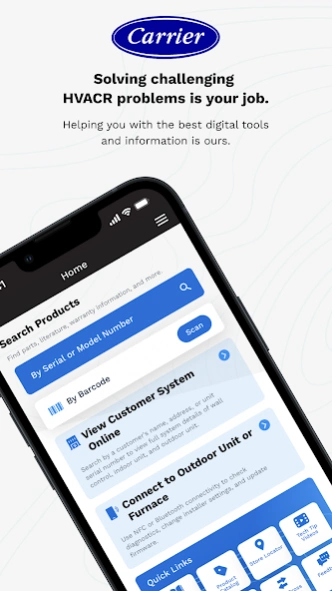
• View Customer System Online — Look up customer details with advanced search filters
• System Capacity Calculator — Calculate airflow capacity based on job-site conditions and specs
• Product Registration — Register equipment quickly from the field
• Intelligent Equipment Search — Find equipment by scanning a serial barcode or entering a serial or model number
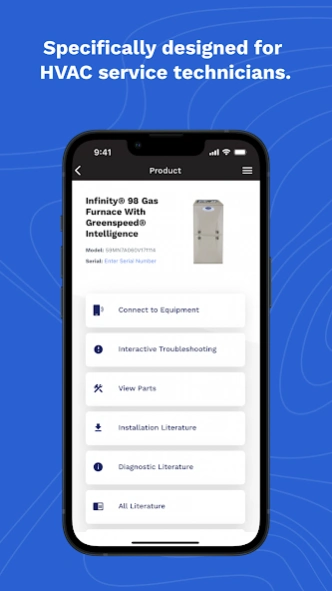
• Parts Identification — Access accurate parts lists for selected equipment
• Technical Literature Access — View technical documents with advanced filtering
• Warranty & Service History Lookup — Retrieve warranty details and past service history by serial number
• Nearest Parts Center Locator — Use GPS to find the closest Carrier Parts Sales Center and get directions
• Totaline® Parts Cross-Reference — Find equivalent and compatible parts
• Job Management — Create and manage job records and associate parts for future reference
• Secure HVACPartners Access — Log in for restricted technical content and documents
• Product Catalog — Browse and search the full Carrier product catalog
• Technician Training Resources — Access online training modules
• Tech Tips Video Library — Watch short, expert-led troubleshooting videos
• Interactive Troubleshooting — Step-by-step guided diagnostics
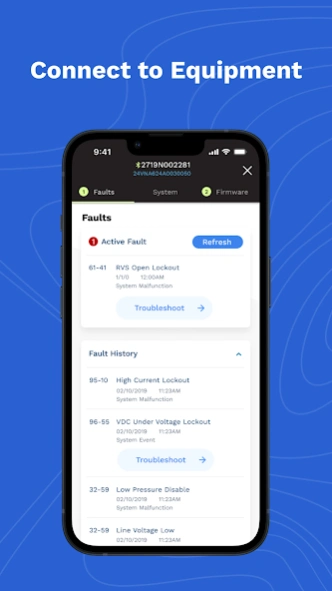
• Bluetooth Diagnostics & Firmware Updates — Pair with compatible systems for real-time fault data, performance metrics, and remote firmware updates
• NFC Connectivity for Installer Tools — Configure installer settings, retrieve diagnostics, and support service board replacement on supported equipment
Commercial field tools
• Site View — Quick status across every site you cover
• Device Manager — Equipment status when you’re on site
• Site & Equipment Details — Specs and history in the field
• Offline Mode — Keep working without signal; sync when you’re back online
• Willis — Alarm troubleshooting and commercial OEM manual lookup
• Faster Field Workflows — Quicker loads and fewer taps for common tasks
One app. Same Carrier sign-in. Built for technicians in the field—residential and commercial.
Previous Versions
Here you can find the changelog of Carrier(R) Service Technician since it was posted on our website on 2016-10-03 01:05:24.
The latest version is 6.169.3 and it was updated on 2026-10-12 16:42:06. See below the changes in each version.
Carrier(R) Service Technician version 6.169.3
Updated At: 2026-09-23
Changes: • Faster job search with pagination
• Better furnace setup, diagnostics, and control board replacement
• More reliable thermostat testing and settings
• Sign-in, stability, and security fixes
Carrier(R) Service Technician version 6.166.4
Updated At: 2026-08-12
Changes: - Bug Fixes: Resolved various issues to improve app stability, performance, and overall user experience.
Carrier(R) Service Technician version 6.165.3
Updated At: 2026-07-28
Changes: Enhanced support for Carrier Smart Thermostat with IntelliSense delivers faster commissioning and diagnostics.
What's new:
• Automatic IDU/ODU detection during Bluetooth and QR code onboarding
• Built-in Bluetooth troubleshooting
• Improved HVAC configuration and system summaries
• Real-time heating and cooling performance data during testing
• Remote Diagnostics for identifying system issues without an on-site visit
Carrier(R) Service Technician version 6.164.7
Updated At: 2026-07-16
Changes: Abound HVAC Performance is now in one Carrier app for residential and commercial techs.
Residential experience is unchanged. Commercial techs get Site View, Device Manager, Site & Equipment Details, offline caching, and Willis for alarm troubleshooting and OEM manual lookup—plus faster screens and fewer taps.
Same Carrier sign-in. Same sites and permissions.
Carrier(R) Service Technician version 6.163.3
Updated At: 2026-06-30
Changes: - Bug Fixes
Carrier(R) Service Technician version 6.161.3
Updated At: 2026-06-03
Changes: - Bug fixes and Minor enhancements
Carrier(R) Service Technician version 6.156.3
Updated At: 2026-03-25
Changes: - Smarter AI-powered Pre-Job Summary with insights, confidence indicators & feedback options
- Dynamic checklists, improved tools, service history & structured technician notes
- Export summaries as branded PDFs (EN, FR, ES) & AI summaries added to reports
Carrier(R) Service Technician version 6.154.2
Updated At: 2026-02-25
Changes: • Enhanced Pre-Job Summary and Post-Job Report workflows with improved PDF generation and sharing experience.
• Improved application stability, localization handling, and overall user experience.
• Addressed NFC-related issues and UI inconsistencies for a more reliable technician experience
• Bug Fixes
Carrier(R) Service Technician version 6.153.2
Updated At: 2026-02-11
Changes: - The Post-Job Report feature is now live, enabling technicians to create professional, standardized reports with a single tap. Reports are AI-assisted and available in both technician and homeowner formats, ensuring clear and consistent documentation for every job. Generated reports can be easily exported and shared as PDFs, alongside overall performance improvements and bug fixes for a smoother experience.
Carrier(R) Service Technician version 6.148.2
Updated At: 2025-12-03
Changes: - Faster AI chat history loading for technicians.
- Cleaner “Create an Account” fields and a new floating Continue button on email verification.
- UI alignment fixes for iOS 26.0 and updated furnace model data for new SKUs.
- Analytics session data now reset on logout.
- Improved username copy/paste, Connect to Equipment spacing, and self-test button behavior.
- Fixed staging Tetra firmware version display, Aux Heat Lockout temperature accuracy, and other stability bugs.
Disclaimer
Official Google Play Link
We do not host Carrier(R) Service Technician on our servers. We did not scan it for viruses, adware, spyware or other type of malware. This app is hosted by Google and passed their terms and conditions to be listed there. We recommend caution when installing it.
The Google Play link for Carrier(R) Service Technician is provided to you by apps112.com without any warranties, representations or guarantees of any kind, so access it at your own risk.
If you have questions regarding this particular app contact the publisher directly. For questions about the functionalities of apps112.com contact us.